

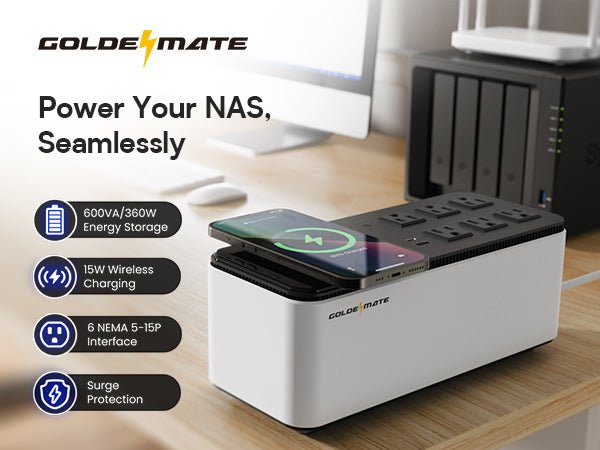
Network-attached storage (NAS) systems hold some of your most important files including photos, work documents, client backups, surveillance footage, and even entire business databases. Because of that, many users want to know one important thing: Is it safe to use a UPS with a NAS system?
This guide explains why a UPS is important for NAS owners, what type of UPS is safest, and how Goldenmate’s LiFePO4 UPS units offer the best protection.
Is It Safe to Use a UPS for NAS Systems?
Is it safe to use a UPS for NAS systems? The short answer is yes. Using a UPS is not only safe but essential. A UPS keeps your NAS running during outages, prevents sudden shutdowns, protects the drives, and keeps your data safe from corruption.
Why NAS Systems Need a UPS for Safe Operation
A NAS is always running in the background, storing and transferring data for your home or office. But NAS devices are sensitive to power problems. Sudden loss of power can damage the file system, shorten the lifespan of the hard drives, or even corrupt the RAID array.
A NAS is constantly reading and writing data. If power drops while it is mid-write, files can become corrupted, RAID systems may go into rebuild mode, and the NAS may not reboot properly.
NAS systems also need consistent voltage to stay healthy. Voltage dips and surges put stress on electronic components and can cause premature failure. A UPS keeps voltage stable, ensuring your NAS operates smoothly even when the grid isn’t steady.

How a UPS Protects Your NAS System
A UPS works like a backup shield between your NAS and the wall outlet. It keeps your device running long enough to shut down properly and prevents damage caused by unstable power conditions.
Battery Backup That Prevents Data Loss
During a blackout, a UPS gives your NAS a temporary power source. This gives you enough time to save any active files, complete ongoing transfers, and let the NAS shut down safely without corruption.
Surge and Spike Protection for Sensitive Drives
NAS drives and internal components are very sensitive to sudden voltage spikes. A UPS absorbs or blocks these spikes and prevents them from reaching your device. This protects hard drives, SSDs, and your computer. If you live in an area with unstable electricity, such protection is critical.
Why a LiFePO4 UPS Is the Best Choice for NAS Owners
Not all UPS systems provide equal protection. Many older models use lead-acid batteries, which degrade quickly and deliver inconsistent backup performance. Goldenmate LiFePO4 UPS systems offer better stability, safety, and long-term value.
LiFePO4 Offers Safer and More Stable Backup Power
LiFePO4 batteries run cooler, last longer, and deliver consistent voltage. This is ideal for a NAS, which needs clean and stable power to protect data and avoid drive stress. Some of its many benefits include:
-
Advanced LiFePO4 batteries with a 10-year lifespan
-
Maintenance-free operation
-
Stable voltage output even during dips and sags
-
This ensures the NAS receives clean, uninterrupted power at all times.
Faster Charging Means Better Protection
LiFePO4 batteries recharge much faster than lead-acid. If your area experiences frequent outages, your UPS must recover quickly to stay ready. Goldenmate’s fast-charging LiFePO4 cells ensure the system is fully prepared between interruptions.
Better Efficiency for 24/7 Devices Like NAS Systems
A NAS typically runs nonstop. LiFePO4 UPS units are more efficient and lose less energy during conversion. This means lower heat generation and longer battery runtime.
Goldenmate UPS Features That Make It Safe for NAS Systems
Goldenmate’s 1000VA/800W LiFePO4 UPS includes several features designed specifically for sensitive electronics like NAS devices.
Pure Sine Wave Output Protects Sensitive Electronics
A NAS performs best on pure sine wave power. It keeps the internal power supply stable and prevents electrical noise.
Goldenmate UPS units deliver clean, pure sine wave output, making them compatible with popular NAS brands such as Synology, QNAP, Asustor, TerraMaster, and WD My Cloud. Hence, your NAS system will run smoothly even during outages and transitions.
Fast 20ms Transfer Time Prevents NAS Shutdowns
Some UPS units are slow to switch from wall power to battery power. Goldenmate’s transfer time is less than 20ms, fast enough to keep NAS devices online without rebooting.
This prevents RAID rebuilds, file corruption, and drive wear. Your NAS won’t even notice the outage.
Built-In Surge Protection for Hard Drives and Motherboards
With 8 NEMA 5-15P surge-protected outlets, you can connect the NAS, router, modem, and network switch—all of which need protection. This ensures the entire data chain stays safe.
Smart Cooling Fan That Protects Hardware
NAS units often run near other electronics. A hot UPS can raise room temperature and stress the drives. The built-in cooling fan, which runs below 30 dB and activates only when needed. This helps to reduce heat buildup and maintain a cool environment for your NAS equipment.
Intelligent LCD Panel for Easy System Monitoring
The LCD screen lets you see battery level, load level, and runtime estimates. This gives you full control and helps you manage your NAS during outages.

Common Power Problems a UPS Solves for NAS Owners
Power issues are one of the leading causes of NAS failure. Goldenmate’s UPS systems are built to handle all major electrical problems.
Protection Against Blackouts and Outages
The UPS keeps your system running long enough to shut down safely. Ideal for homes with unstable power.
Stability During Voltage Fluctuations
Your NAS stays healthy even when:
-
Voltage drops too low
-
Voltage spikes suddenly
-
The grid becomes unstable
This extends the life of your NAS drives and power supply.
Defense Against Surges and Lightning
Power surges can destroy a NAS instantly. The UPS absorbs spikes before they reach your device.
Handling Brownouts and Low Voltage
Low voltage causes power supplies to strain and overheat. Goldenmate’s UPS corrects this automatically.
How to Connect Your NAS to a UPS Safely
Connecting a NAS to a UPS is simple, but doing it properly ensures maximum safety and reliability.
Plug the NAS Into a Battery-Backed Outlet
Only connect your NAS and essential network devices to the battery-backed outlets. Avoid plugging in printers, heaters, and high-power appliances. These can overload the UPS.
Protect the Router and Switch
Your NAS needs network access during an outage for safe shutdown. Plug these devices into the UPS router, switch, and modem. This keeps your entire network online.
Enable Auto-Shutdown in Your NAS Settings
Most NAS systems support UPS communication. This means the NAS can shut down by itself when battery levels get low.
Synology, QNAP, and others allow:
-
USB UPS connection
-
Network UPS server
-
Auto-shutdown timing
This prevents file system damage.
Why Goldenmate UPS Is a Smart Investment for NAS Users
Goldenmate’s UPS systems combine safety, long-life batteries, and premium power protection. Compared to old lead-acid UPS units, they offer much better long-term value.
Quiet, Compact, and Ideal for Home or Office
The UPS fits easily into server shelves, desks, and network cabinets. It also runs quietly, making it perfect for home offices, living rooms, and small businesses.
Lower Total Cost Over 10 Years
LiFePO4 batteries last much longer than lead-acid. Because of this, Goldenmate UPS units reduce the total cost of ownership by helping you avoid battery replacements, repairs, and unexpected failures, making it a high-value, long-term investment.

Final Thoughts
Using a UPS with your NAS is not just safe, it’s one of the smartest ways to protect your data. The right UPS prevents corruption, protects hardware, and ensures your system stays healthy for years.
If you rely on your NAS for work, backups, or personal storage, a Goldenmate UPS is one of the best investments you can make.
Share:
Top 10 Everyday Scenarios Where a UPS Can Save You
What to Look for When Buying a UPS for Home or Office